
Build a collection loop that keeps device access, observations, actions, and result checks connected throughout one attempt.
A real Android device can run the task. It does not automatically produce a trajectory that another person can interpret.
In the previous article, we examined what should be recorded during a mobile AI task. Collecting that information requires a process: prepare the environment, capture the observation, issue an action, observe what follows, and assess the ending while preserving the connections.
The workflow below is a practical design approach for an authorized test environment. It is not a description of a finished ARMARRAY trajectory-recording product, and it does not prescribe one automation framework.
Start with a small collection contract
Choose one task and define what counts as an attempt before connecting a large device pool. Specify the starting conditions, allowed interactions, completion criterion, stop conditions, and evidence needed to assess the result.
Continue with our illustrative note task: create “Site visit,” enter “Bring the access badge,” and inspect the saved contents. Define whether a retry stays within the attempt and what kind of reset begins another one.
Also decide who issues actions. A scripted test, an AI agent, and a human demonstrator can each generate interaction records, but their control paths differ. For this example, assume a controller issues actions and collects observations. A human-driven workflow would need its own way to record the actions actually taken.
Establish device access and verify the starting state
Select the intended device explicitly and check that the controller is connected to that device. Associate its test identifier with the attempt. In a multi-device setup, prevent another worker from sending inputs to the same device during collection.
Android Debug Bridge provides a standard route for communicating with an authorized Android device and accessing its shell. Its documentation also describes device selection and screenshot capture. These are useful building blocks, not a complete trajectory collector. Android Debug Bridge documentation
Prepare the app and test data, then verify the relevant starting conditions through observation or an appropriate check. Launching the app does not establish that it is on the expected screen. Reopening it does not necessarily remove notes created in a previous attempt.
Keep the preparation result separate from the task result. If the required initial state cannot be established, stop or label the setup problem rather than presenting the run as an ordinary failed task.
Choose observation and action methods together
The collection method should fit the application and the task. A controller may use screenshots for visual observations and an automation framework for interactions. Where UI element information is available, it can supply additional context for locating targets.
UI Automator is an Android testing framework for cross-app UI testing, including interactions with visible elements in installed apps and system interfaces. Its suitability still needs to be checked against the target app and the information that app exposes. UI Automator documentation
For coordinate-based interactions, preserve the relationship between the observation dimensions and the action coordinates. A tap chosen from a resized image must be mapped to the device view correctly. Orientation changes or an unexpected dialog can invalidate a previously selected target.
A remote video stream can help an operator watch execution, but it does not by itself identify which frame informed an action. If the agent works from selected frames, identify those frames and their capture context in the record.
Run an explicit observe–act–observe loop
Capture the initial observation and associate it with the attempt. Let the controller select an action in that context. Record the operation and its parameters, issue it, and retain the execution response that is actually available.
Then collect a subsequent observation according to the task’s wait policy. For example, wait for a relevant UI condition with a bounded timeout, rather than treating an arbitrary pause as proof that the app finished processing. If a fixed delay is used, record it as a collection choice, not as a success check.
Link the new observation to the step without claiming that every visible change was caused by the action. Background activity, notifications, or a remote service can also affect what appears.
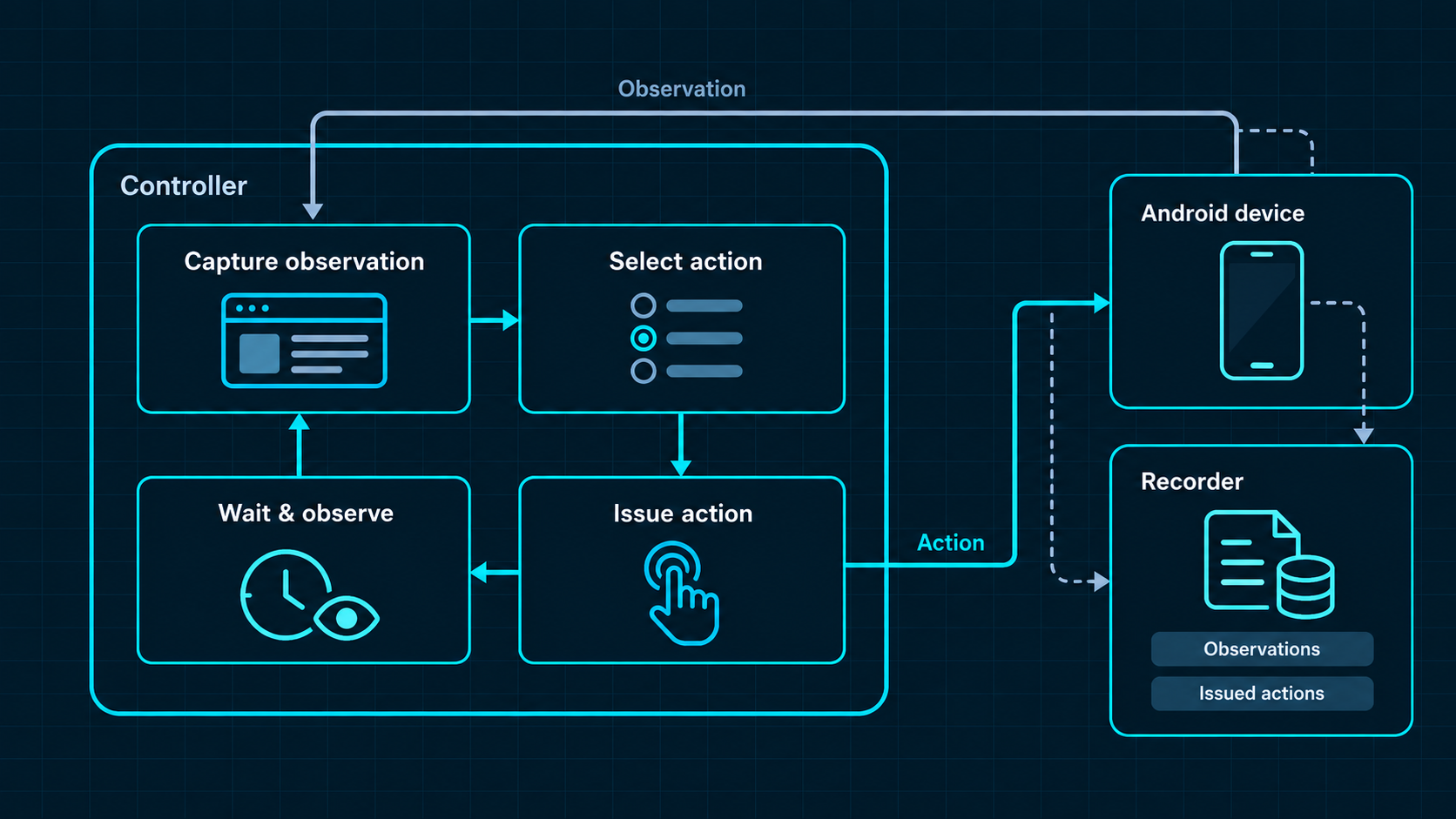
In the note example, the loop might observe the list, open the editor, observe it, enter the requested contents, inspect them, issue Save, and observe the list again. Reopening the note provides a further observation for the content check. These are illustrative steps, not a measured device run.
Preserve timing and failures at the collection boundary
Record capture time separately from receipt time when the collection path makes that distinction relevant and available. Keep explicit step and observation associations so delayed delivery does not silently change the meaning of an image.
If an observation cannot be collected, record the failure at that point. Do not attach the last successful screenshot as though it were a fresh view. If the action channel reports a timeout, distinguish that report from a confirmed application failure: the action may have reached the device even though the response was lost.
Before retrying an action whose effect is uncertain, inspect the current state when possible. Reissuing a non-idempotent operation can produce a duplicate or otherwise alter the task. The collection record should preserve that uncertainty and the recovery decision.
Check the outcome before resetting
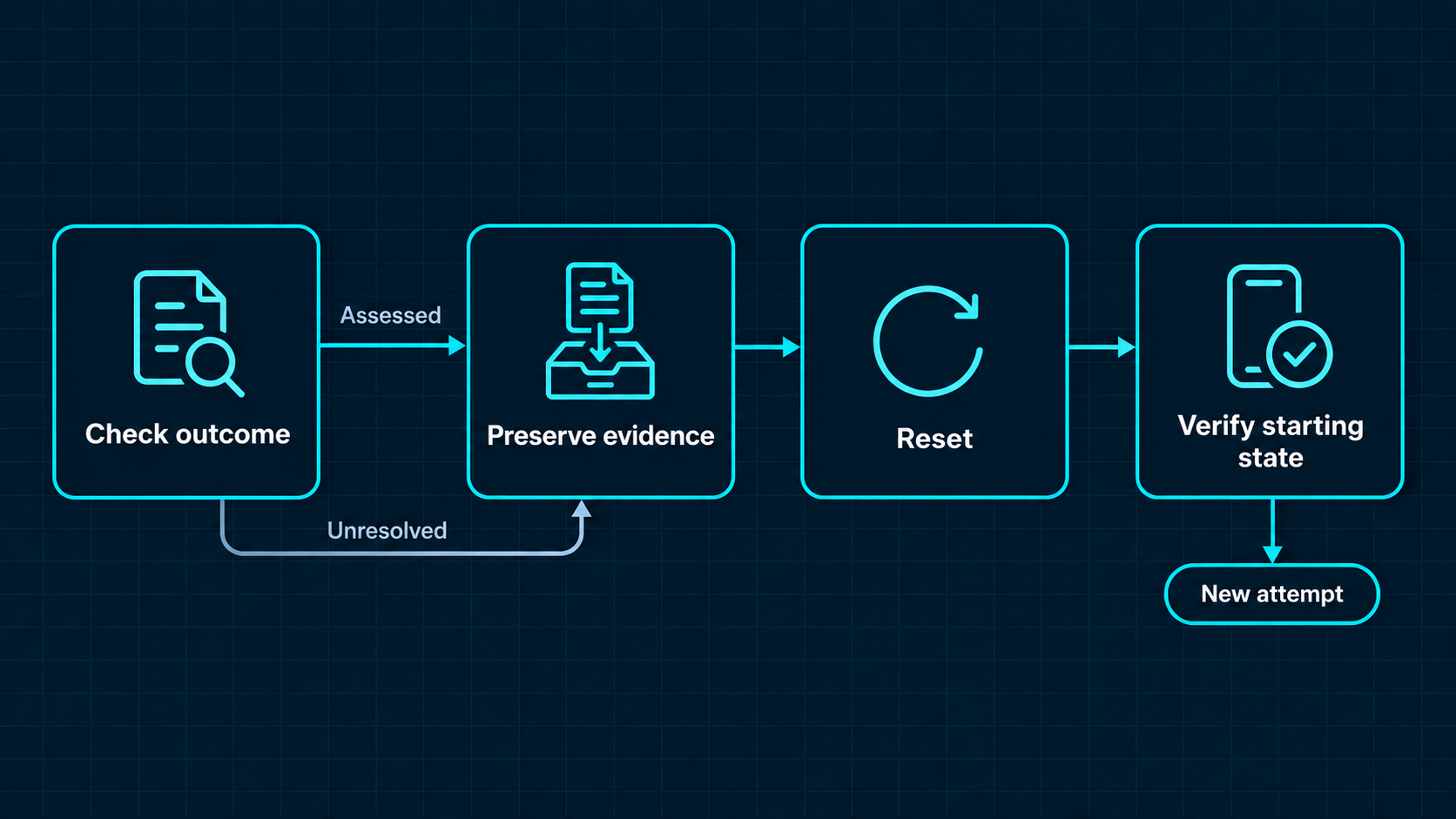
Evaluate the completion criterion using the evidence available at the end of the attempt. Keep the agent’s stop decision separate from the checker’s conclusion.
For the note task, observing both requested fields after reopening supports the defined visible-content check. A stronger claim about persistence or synchronization would require its own evidence. If a final check cannot be completed, retain an unresolved result rather than inventing a binary label.
Save the final observations, assessment, and termination reason before cleanup changes the environment. A reset should be an explicit operation with a checked result, not an assumption that the next attempt will start cleanly.
Validate one attempt before scaling collection
Review a complete attempt from beginning to end. Can the initial state be identified? Does each important action refer to the observation used to select it? Are the relevant images readable, event associations intact, and outcome evidence available?
Then test the collection process against interruptions: a delayed observation, an action timeout, an unexpected dialog, or a reset that does not restore the intended state. These checks evaluate the collector as well as the agent.
Only expand to additional devices or concurrent attempts after that small loop is understandable. As collection grows, keep device ownership, attempt boundaries, and artifact associations explicit so outputs from different runs are not mixed.
Separate infrastructure from the collection workflow
Device availability, remote access, and observation or control channels make execution possible. The controller, recorder, and outcome checker make a run interpretable. Confirm which components are available in the proposed setup and which require integration before treating the environment as a collection system.
This is the useful starting point for a real-device collection discussion: one target task, one verified access path, and one reviewable attempt. Physical execution can supply the setting; the collection workflow must still preserve the evidence.
The next article will examine how to turn these raw execution records into structured AI data while retaining their sources, relationships, and limitations.